


Point of Sale
- Designed for tablet-style Android mobile devices, it can also operate on smartphones and enables the recording of Cash Sales for Purchased or Manufactured Products at a Point of Sale (POS).
- The user selects the Store, Cash Register, and Salesperson, which will remain constant throughout all subsequent sales transactions.
- The application features a Shopping Cart to which the user adds Purchased or Manufactured Products using three options:
- By clicking or tapping directly on the Product's name or image. The products displayed on the screen are filtered by selecting the Product Class or Category, and are shown only when inventory is available.
- Using a barcode scanner connected—either via cable or wirelessly—to the mobile device.
- By scanning the product's barcode using the mobile device's camera.
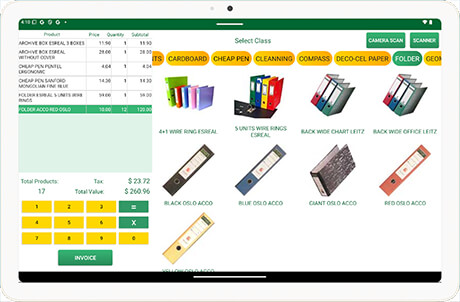
- The recorded quantities of a Product can be increased by repeating the recording actions, or adjusted manually within the Sales Cart.
- The application allows you to register a new customer, select an already registered customer, or issue an invoice in the name of an anonymous customer.
- The sale is always recorded as a Cash Sale, and the collection received can be recorded as either cash or credit card.
- Recording the sale simultaneously deducts items from inventory and updates the system's accounting records.
- The supporting document or invoice is generated and stored in the device in PDF format, and can be printed using a standard or thermal printer connected wirelessly (via Bluetooth) to the device.
| HOME | e-Commerce | Contact us | SITE MAP |
© ESREAL is a registered trademark of ESREAL LLC.
- Menu
- ERP
- Administration
- Purchases
- Operations
- Sales
- Accounting